Table of Contents
adv.startPushNotifications()
GCM push notifications are deprecated. wrtc_kit does not support push notifications at the moment.
wrtc.adv.startPushNotifications() starts GCM push notifications that allow user to receive phone calls even when browser is not open.
GCM push notifications is a Google specific push notification only available for the Chrome web server. Attempting to call wrtc.adv.startPushNotifications() on other web servers will fail silently.
First time wrtc.adv.startPushNotifications() is called the web browser will pop up a question box asking user to allow notifications:
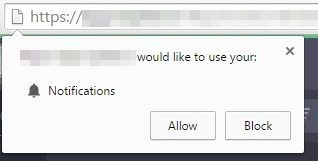
The user's allow/block selection will then be remembered, all future wrtc.adv.startPushNotifications() calls will be allowed/blocked by the browser itself without ever asking user again.
Therefore it is important to explain to user she needs to allow notifications before calling wrtc.adv.startPushNotifications() the first time. If user once blocked notifications it is difficult to enable them again.
Arguments
wrtc.adv.startPushNotifications(apiKey, senderId)
- apiKey - (optional) string containing Firebase Legacy server key
- senderId - (optional) string containing Firebase Sender ID
If arguments are omitted wrtc.adv.startPushNotifications() will use wrtc_kit's default test account with:
apiKey "AIzaSyDOK4MLYAlxidyHq2e5Pir9slk8KN5BySo"
senderId "279685133220"
If you have created your own cloud messaging account you need to supply its API key and Sender ID as arguments.
wrtc.adv.startPushNotifications("stop") stops push notifications again.
Returns
Nothing.
Usage
You usually store client ID in cookie after you have called wrtc.adv.startPushNotifications().
You should then attempt to restart push notifications in wrtc.onLoggedIn() to detect if user has blocked notifications or not.
Events
wrtc.onNotifications(true) will occur if web push notifications has been started successfully. (User or browser allowed notifications.)
wrtc.onNotifications(false) will occur if user or browser has blocked notifications.
wrtc.onError(null, {errorCode:621, errorMsg:"<error name>: <error description>"}) will occur if service worker or push notification could not be started correctly.
Example
wrtc.adv.startPushNotifications("AIzaSyDOK4MLYAlxidyHq2e5Pir9slk8KN5BySo", "279685133220");
Advanced
wrtc.adv.startPushNotifications() starts a service worker to be able to receive notifications even while browser is closed. The path to the service worker file sw.js is stored in wrtc.i.swPath - if you are using your own webserver you need to store sw.js (and manifest.json) on your own server, and set wrtc.i.swPath in wrtc.init().